
Step by Step: Initial Setup Of Parker’s Mobile IOT Tools
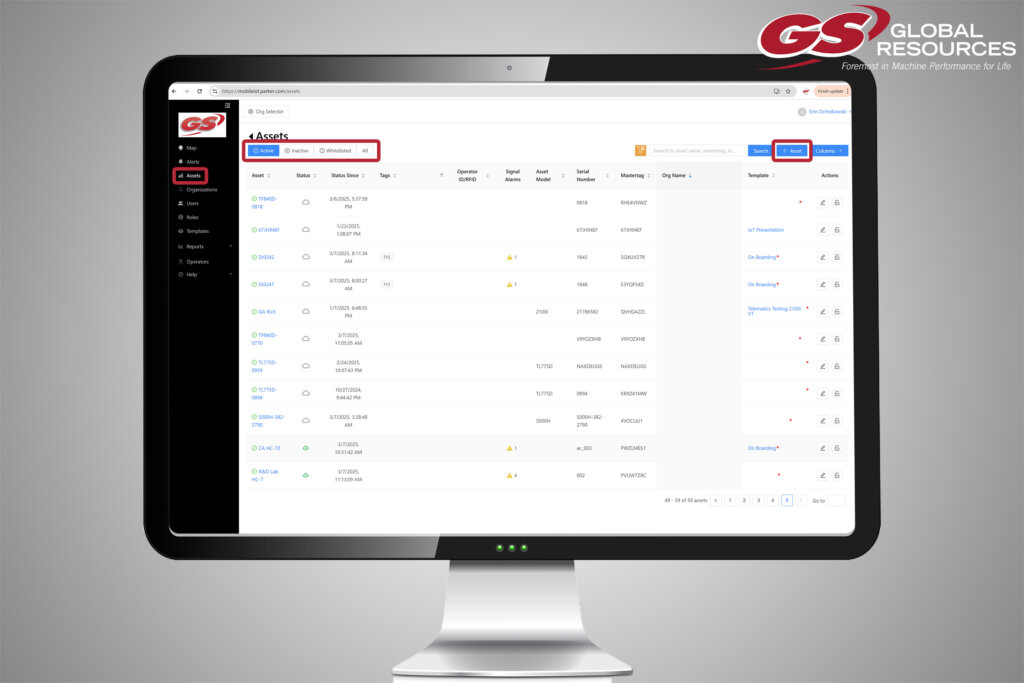
There are always new tools and features to master in Parker Hannifin‘s IQAN® creative suite, including new IOT capabilities. But where do you start? What are the first steps after ordering the necessary hardware? As one of Parker’s top distributors, the GS Global Resources team can walk you through everything, from ordering components, to setting up your data plan, and taking full advantage of the tools within the portal.
Ordering Gateways and Data Plans
You can do this through GSGR and Parker will ship it to our headquarters for set up. Parker assigns the asset to the GS whitelist when it ships. After your gateway arrives to GSGR, we transfer it to the OEM’s whitelist, which contains all their non-active assets. Your data plan can also be ordered through GSGR and we will coordinate that through Parker Morton. Parker then assigns your data plan to GSGR and we will assign the Data Plan to your whitelisted asset. From this point, your data plan can be managed in one of two ways. GS can manage your assets and gateways, or you can manage your assets internally.
Validating and Activating Assets
Whoever is managing your assets, either your team or GSGR, will assign an on-boarding template to your assets, which is essentially the state in which it is validated before activation. After validation, it will switch to a released state and need to start using the corresponding data plan. You will also need to assign a service plan to the asset. Within the Support Portal, you will need to edit your asset and select an available plan that’s connected to your account in Service Plan Details window.
Initial Asset Setup
Once hardware and data plans have been purchased and your asset is in a whitelisted status, you will also need to assign a service plan to the asset. Within the Support Portal, you will need to edit your asset and select an available plan that’s connected to your account in Service Plan Details window. You will then need to activate the asset. Within the portal, there is a section with all an organization’s active assets. Within that section, you can add an asset to bring a whitelisted asset into an active state. In the new asset information window, click on the Master Tag drop down menu and select the whitelisted master tag to be activated. Once you’ve filled in the new asset’s information, you will move it to an “On Boarding” state and submit it for validation. Then, it will switch to a released state and need to start using the corresponding data plan.
Renewing Existing Gateways
In the case of an asset that has an expiring service plan, Parker will alert our team approximately 30 days in advance. Working with Parker and factoring in other costs, we will quote the renewal and submit a PO. If the asset’s Master Tag appears on the PO, Parker will assign the Data Plan renewal directly to the specified asset. But if it doesn’t appear on the PO, Parker will treat this PO as a new Data Plan order and follow the steps laid out in the previous scenario.
Once you have your hardware set up and connected, you may want to set up sub organizations either for your end users or dealerships to make use of these tools. Take a look at this step by step guide to setting up those sub organizations, creating different roles for individuals, and assigning them assets and service plans.
Stay tuned for more instructional content on Parker’s Mobile IOT platform and contact us today to start taking advantage of this tool in your machine line.




