
Which Display is Right for your Machine?
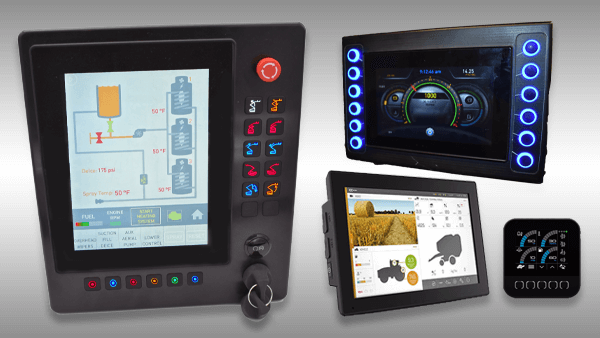
As software and graphics have continued to advance, displays have become the most concise way to monitor machine set up, display critical status data, and convey real time process information. But along with the increase in technological advances has come an overwhelming number and variety of display options for OEMs to choose from. And rather than simply choose one based on the size or price point, it’s important to think through a few simple questions to determine which of the available displays will be the most usable and ergonomic for the operator.
Mounting
First and foremost, it’s essential to evaluate how a display will physically integrate into the rest of the HMI layout. Will you mount it on the end of a fully populated armrest assembly? Or even install it within the armrest itself? Or perhaps it makes the most sense to separate it completely and mount it on the dash or a pillar? Your decision will be based on the operator’s working position, the weight and functionality of the armrest, and a number of other factors.
Functionality based on application and environment
Think about what is happening with your machine while the operator is working. Are they inside of a cab or exposed to the elements? Is there a lot of machine vibration or shock being absorbed? Are they operating in frigid temperatures and likely wearing gloves? Is there likely to be significant glare or issues with readability? All of these elements must be considered when determining the usability of a certain display in your machine’s typical environment. For example, a touch screen may seem like the flashier option, but if it’s not functional for the operator, choosing one with at least a small number of buttons will be better for overall production.
Also, what is the primary purpose of this display? Will it mostly serve as a monitor, simply showing J1939 data and other control system information? In that case, a simple plug & play option may be the best fit. However, if the operator will control primary machine functions through the display, it needs to be easily accessible within arm’s reach.
Size and Placement
Display size will be contingent on how placement and mounting. The farther away it is from the operator, the bigger any text will need to be in order for information to be readable. The more information or functions you want to be able to show at one time, the larger the screen will need to be. Or you will require a display with multiple programmable pages in order to make all of that digestible to the operator.
Distance from the operator is also an important factor when considering the right display size. For example, if it is a few feet away from the operator on a pillar or dashboard, and there is critical machine information they need to see while working, you will need a bigger screen to ensure readability.
Display Capabilities Via Software
As your list of desired display functions grows, so will the need for a more advanced component. If you want to incorporate complex images or animations to model specific machine functions, you will need more advanced graphics capabilities. Or if improving safety is top priority for this machine update, the ability to incorporate video monitoring from a camera system will be important. More and more features are possible with newer controls, giving operators access to PDFs, tutorial videos, schematics and more directly through a machine’s display. If providing these tools to operators is important, you will need a display with the capacity to do that.
Our engineers have integrated countless display options into a wide variety of machines for many different industries. Contact us today and we will work with you to determine the right solution for your machine to support a positive overall operator experience.




